

Big Walk’s accessibility work is unusually load-bearing, because the game’s core mechanic is communication and the challenges built on it can require hearing, reading, speaking, typing, quick reactions or fine motor control. House House’s answer is a skip system that covers any of those, plus a set of per-player comfort options.
The important structural detail: one of these is a group setting. Challenge skipping is enabled by the host when starting a session, so it is decided before you play rather than adjusted when someone hits a wall.
The seven published options
Directly from the official FAQ, Big Walk allows you to:
- Skip any challenge (host-enabled — see below)
- Rebind all controls — Settings > Rebinding
- Choose from multiple crosshair styles
- Choose between “Hold” or “Toggle” for some controls
- Adjust the field of view — Settings > Graphics
- Select from various Motion Reduction overlays — Settings > General
- Pick up and carry other characters
House House also state that some items in the game can improve accessibility, giving highlighting interactive items as the example. And they close the section with an open invitation: “Want an accessibility feature beyond those described above? Please let us know!” — support is at help@bigwalk.game.

Challenge skipping is a host decision
The mechanism, in their words: certain challenges “require particular abilities to complete, including the ability to hear/read, speak/type, react quickly, or use fine motor skills,” and the in-game setting “can allow you to skip any challenge that might otherwise be inaccessible to you.”
To turn it on, the host uses the accessibility menu when starting a session.
Two consequences worth planning around:
- It is not a per-player toggle mid-session. If someone in your group needs it, the host has to enable it at launch — which means the conversation happens before session one, not during it.
- There is no penalty attached. Big Walk has no completion percentage, no scoring, and no achievement documented as being gated on doing challenges the hard way.
If your group is unsure, turning it on costs nothing. Nobody is forced to use a skip that exists.
What Steam lists separately
Steam’s own accessibility categories for Big Walk add four labels that are not spelled out in the FAQ:
- Camera Comfort — corresponds to the FOV and motion reduction options
- Color Alternatives — likely the crosshair styles, though House House have not linked the two explicitly
- Adjustable Difficulty — corresponds to challenge skipping
- Playable without Timed Input — corresponds to the “react quickly” case that challenge skipping covers
These are storefront metadata rather than a separate feature set, and are listed here because they are what a player filtering the Steam store by accessibility will actually see.
Carrying each other
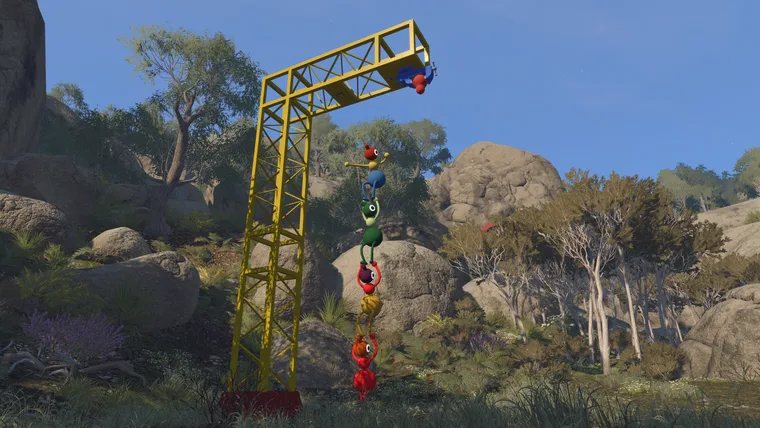
Characters can pick up and carry each other “when needed.” House House list this under accessibility rather than under traversal, which is a hint about what it is for: a player who cannot manage a particular movement can be moved.
It also has a communication use. In a game where speech disappears past a certain distance and through walls, physically moving someone is one of the least ambiguous messages available — comparable to pointing, but with the destination guaranteed.
Text chat is the other major accessibility answer, and it gets its own page: it has the same features and the same intentional limitations as voice, and House House confirm you can finish the entire game without a microphone.
Using the options together
The features overlap in useful ways, and a group with an access need usually wants two or three of them rather than one.
Someone who cannot use voice chat. Text chat is the answer, and it is not a reduced experience — it carries the same features and the same intentional limitations as speech, including distance falloff, soundproof barriers and travelling through walkie-talkies. House House state you can finish the whole game that way “without missing out.” Pair it with challenge skipping if any challenge requires typing at speed.
Someone who gets motion sick. Motion Reduction Overlays first, then field of view — that is House House’s own order. Both live in different menus (General and Graphics respectively), which is easy to miss.
Someone with limited fine motor control. Rebind everything, set the affected inputs to “Toggle” rather than “Hold”, and have the host enable challenge skipping. Steam’s Playable without Timed Input category means that with skipping on, nothing in the game requires an input inside a time window.
Someone who struggles with a specific piece of movement. Any other player can pick them up and carry them. This is a real mechanic rather than a novelty, and House House list it under accessibility for exactly this reason.
Ask for what is missing
The FAQ closes its accessibility section with a direct invitation: “Want an accessibility feature beyond those described above? Please let us know!”
That address is help@bigwalk.game, the same one used for technical support. It is worth taking literally — Big Walk is a small studio’s game with an unusually specific set of ability requirements baked into its core mechanic, and the studio has already built a system that lets any challenge be bypassed. Requests are more likely to land here than they would at a large publisher.
One thing worth including in any such request: which of the four ability categories House House already name — hearing or reading, speaking or typing, reacting quickly, or fine motor control — the gap falls under, and whether challenge skipping covers it or not. Those categories are the studio’s own framing, and a request that maps onto them is easier to act on than one that does not.